AuTuber: VTuber AI Assistant for Auto Emotes, OBS AFK Detection, and VTube Studio
- Published on
- Domain
- Creator tooling
- Focus
- VTuber AI assistance and safe OBS automation
- Team
- AuTuber Development Team (ATDT)
- Stack
- Electron, TypeScript, React, Node.js, OBS, VTube Studio
AuTuber: VTuber AI Assistant for Auto Emotes, OBS AFK Detection, and VTube Studio
Most AI streaming tools can talk about your stream.
AuTuber helps your stream react.
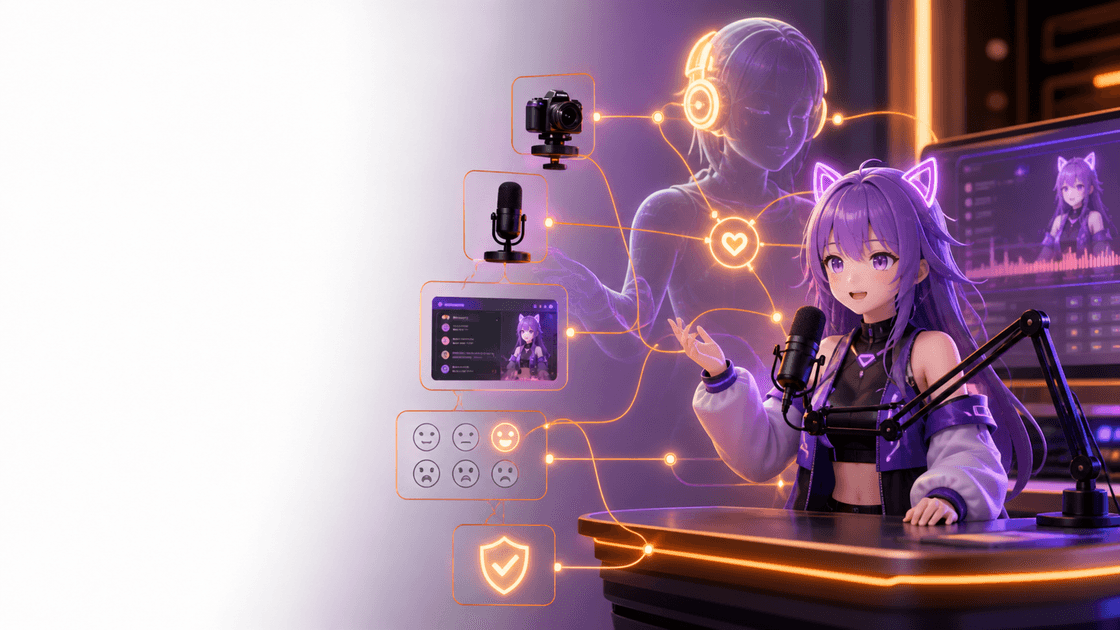
It watches live creator context, asks an AI model what stream action makes sense, validates that action locally, and safely controls tools like VTube Studio, OBS, overlays, and future stream actions.
More specifically, AuTuber is a VTuber AI assistant for auto emotes, VTube Studio hotkey automation, OBS AFK detection, and safe stream-side suggestions.
For VTubers and livestream creators, that means fewer emergency hotkey gymnastics and more room to actually perform.
And since this launched on May 4th, it feels legally required to say:
May the force be with your stream scene transitions.
Most AI tools for streamers are basically chatbots with extra steps.
They can talk. They can summarize. They can maybe write captions.
Very cute.
But what if an AI could actually understand what is happening on stream, choose a useful action, and help run the show without randomly taking over your desktop?
That is the idea behind AuTuber.
Basically: less "these are not the hotkeys you're looking for," more "that reaction cue landed exactly on time."
The Problem: Streaming Is a Full-Time Boss Fight
Streaming looks easy until you actually try doing everything at once.
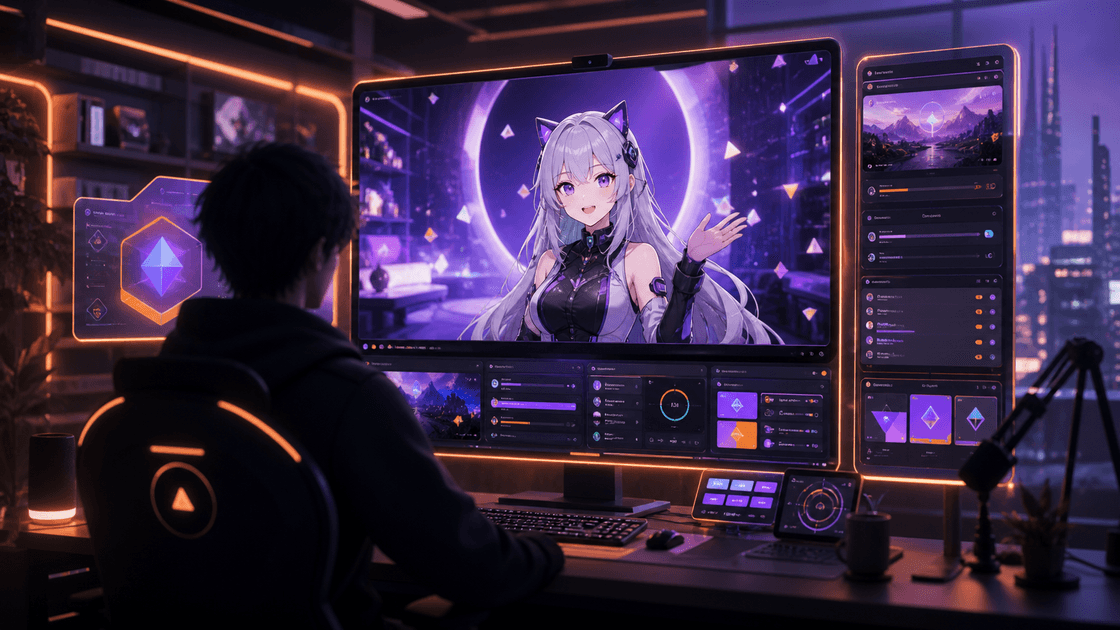
You are talking, reacting, reading chat, checking audio, changing OBS scenes, managing overlays, triggering avatar expressions, and trying to stay entertaining the whole time.
For VTubers, there is another layer: avatar hotkeys.
Want to wave? Press a hotkey.
Want to look surprised? Press a hotkey.
Want to trigger a special expression, prop, or effect? More hotkeys.
Want to hide the horns, show the wings, activate heart eyes, switch scenes, show a BRB overlay, and not accidentally break OBS while doing all of that?
Good luck, gamer.
Or, on Star Wars day: execute Order 66 on your manual workflow, not your stream layout.
The streamer becomes the performer, producer, camera operator, audio engineer, and puppet controller at the same time.
AuTuber was built around one question:
What if the stream could help operate itself, without giving AI unsafe control over everything?
The Pitch: Let the Stream React Safely
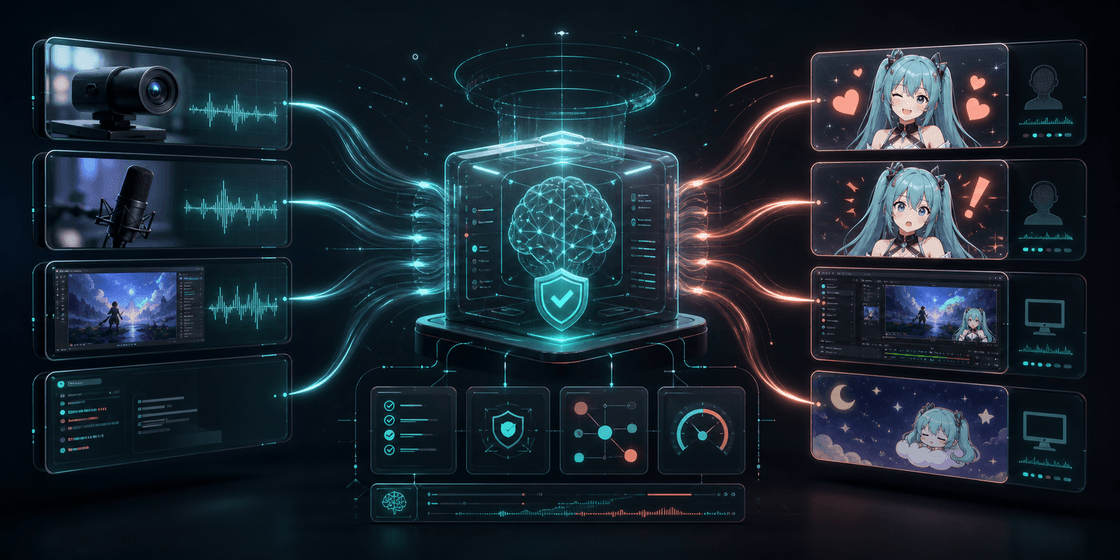
AuTuber turns AI into a local stream-control sidekick.
In plain English:
Camera + Screen + Audio + Stream State
  -> AI understands the moment
  -> AuTuber validates the action
  -> VTube Studio, OBS, overlays, or alerts react safely
This is not just an AI chatbot.
A chatbot produces text.
AuTuber produces validated stream actions.
That tiny validation step is the whole difference between:
"Cool AI assistant."
and
"Why did my AI just switch to the ending scene mid-sentence?"
AuTuber does not give the model a big red button labeled CONTROL MY COMPUTER.
Instead, it gives the model a controlled list of stream actions it may request. Then AuTuber checks those requests before doing anything.
The AI suggests.
AuTuber validates.
The creator stays in control.
What AuTuber Can Do Today
AuTuber is currently an early desktop alpha, but the core loop works.
Today, it can:
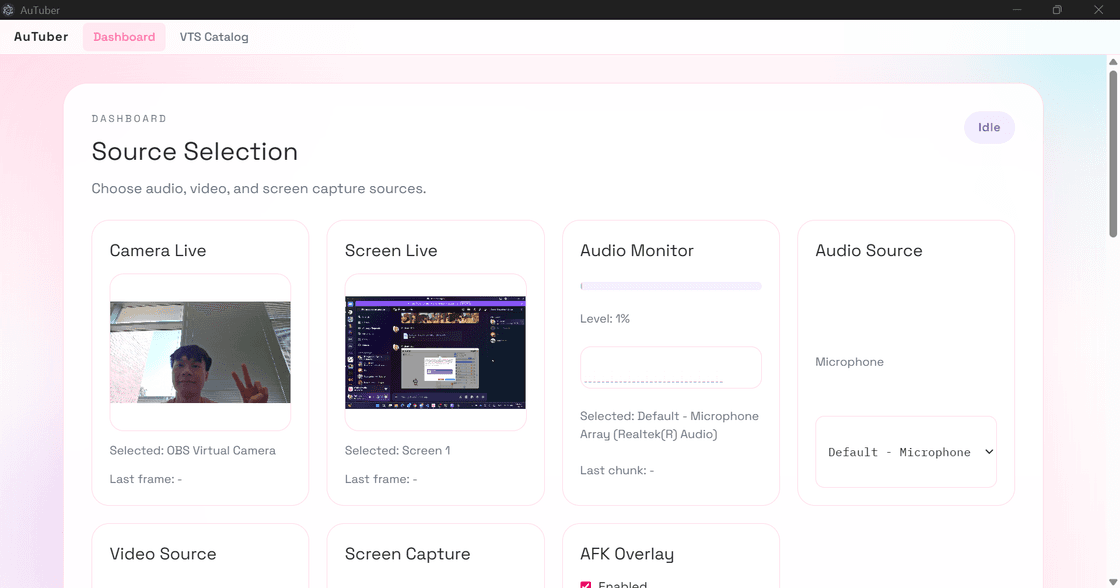
- connect to VTube Studio
- authenticate with the VTube Studio API
- read available VTube Studio hotkeys
- maintain an automation catalog with cue labels and per-hotkey overrides
- trigger approved avatar hotkey actions
- connect to OBS
- read OBS connection, scene, and source state
- configure an AFK overlay helper against a selected OBS scene or source
- capture camera, screen, and audio context from the dashboard
- send structured stream context to an OpenAI-compatible model provider
- run a persistent low-latency model monitor loop
- parse model responses into typed action plans
- validate actions before execution
- enforce cooldowns so reactions do not spam
- show latest model request and response, reviewed actions, and execution results
That sounds like a lot because it is a lot.
But the short version is:
AuTuber watches the stream, asks AI what action makes sense, checks if that action is safe, and then runs it.
VTuber Auto Emotes and VTube Studio Expressions
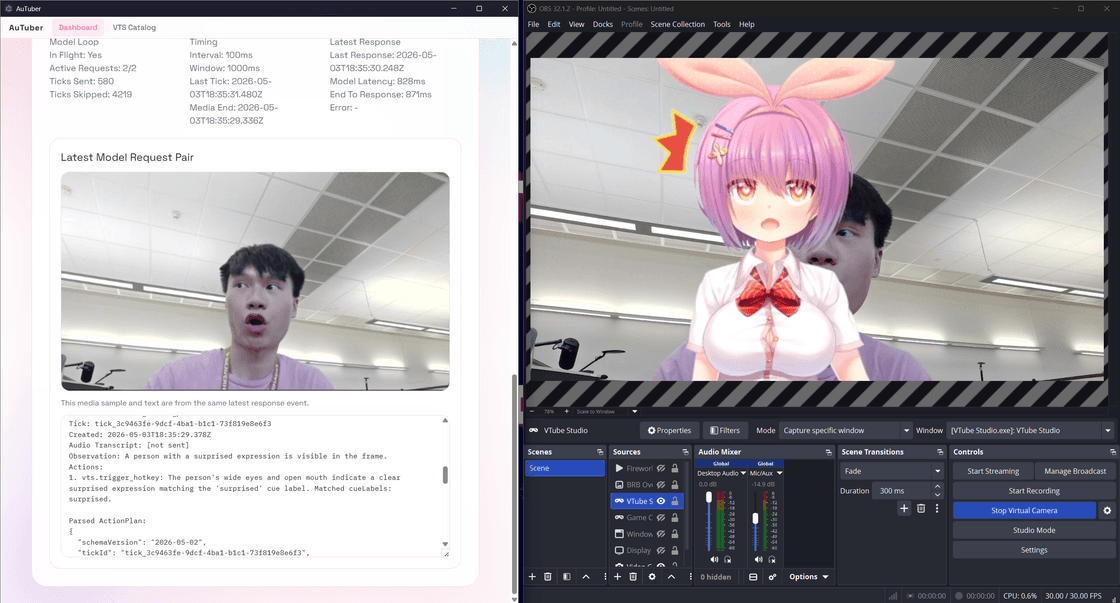
One of the clearest uses for AuTuber is VTuber auto emotes.
If you call them auto expressions, this is the same feature area. AuTuber connects to VTube Studio, reads the available hotkeys, and uses that approved list as the execution layer for avatar reactions.
Instead of reaching for manual hotkeys every time something funny, chaotic, or surprising happens, AuTuber can use stream context to suggest or trigger approved avatar reactions. That includes surprise, laughter, excitement, and other creator-configured VTube Studio expressions already mapped in the app.
The important part is that these automatic VTuber emotes are not blind automation. AuTuber reads the available hotkeys, keeps a catalog of approved actions, validates the requested reaction, and enforces cooldowns so the avatar does not spam expressions every few seconds.
In practice, that makes AuTuber closer to VTube Studio hotkey automation than generic desktop control. The model proposes an expression, AuTuber checks whether the hotkey exists and whether the action is currently allowed, and only then does the avatar react.
That keeps the system useful for automatic VTuber expressions without making it reckless.
OBS AFK Detection
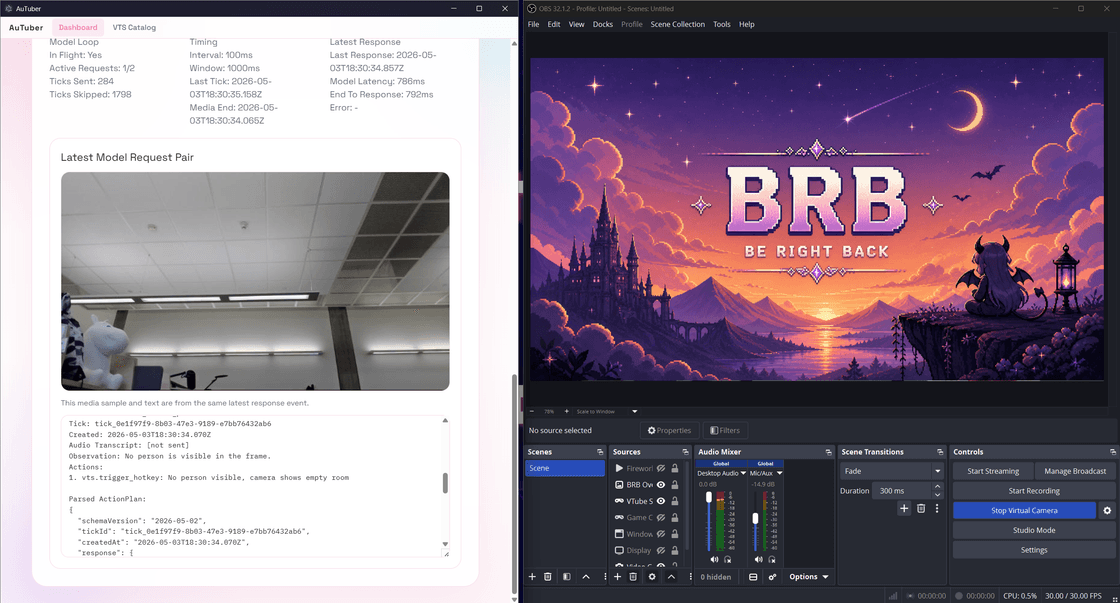
Another high-intent use case is OBS AFK detection.
AuTuber already reads OBS connection and stream state, and it can configure an AFK overlay helper against a selected OBS scene or source. Combined with camera or presence context, that creates the foundation for automatic BRB logic that notices when the streamer has stepped away and helps show the right overlay.
This is where a lot of stream automation tools fall apart. A BRB overlay is only helpful if it is timely and safe. AuTuber treats AFK behavior as a validated workflow instead of a magic trick, so creators can keep confirmation rules and policy checks around anything that changes what the audience sees.
If someone is looking for automatic BRB overlay behavior or an OBS AFK detection assistant, this is the part of the product that answers that need.
OBS AI Assistant Features
AuTuber is also an OBS AI assistant, but in a constrained way.
It can read OBS scene and source state, understand overlay helpers, track stream context, and turn that information into structured action suggestions. It can suggest scene corrections, source changes, overlay cues, or "do nothing" when the stream is already in a good state.
The important design choice is that risky OBS actions do not bypass the app. Reading state is cheap and safe. Changing scenes, hiding sources, or affecting the whole production flow is more sensitive, so those actions can stay behind policy rules, cooldowns, and confirmation gates.
That gives creators practical OBS automation without the usual fear that an AI will suddenly hijack the stream.
You Might Be Looking For
You might be looking for a VTuber AI assistant because you want help controlling avatar expressions.
You might be looking for VTuber auto emotes because you want reactions without juggling manual hotkeys.
You might be looking for VTube Studio hotkey automation because you want approved expressions to fire at the right moment.
You might be looking for OBS AFK detection because you want an automatic BRB overlay when you leave the desk.
You might be looking for an OBS AI assistant because you want help managing scenes, sources, overlays, and stream state.
AuTuber sits in the middle of those needs: a local AI stream assistant that observes context, proposes stream actions, validates them, and safely triggers approved actions through VTube Studio and OBS.
Safe Tool Control: The Important Part
The most important design decision is that the model does not directly control the desktop.
Instead, AuTuber exposes a controlled tool layer, similar to an MCP-style controller.
The AI can request actions like:
- trigger a VTube Studio hotkey
- show an overlay message
- log an event
- suggest an OBS scene or source action
- do nothing when no action is needed
But every action goes through local validation before execution.
Before any model-generated action runs, AuTuber checks:
- Is the action structurally valid?
- Is this action type allowed?
- Is this action blocked by policy?
- Does the hotkey, OBS scene, or OBS source exist?
- Did this action happen too recently?
- Does the current autonomy level allow it?
- Does this action require confirmation?
That means safe actions, like avatar expressions, can run automatically.
Riskier actions, like OBS scene changes or source visibility changes, can require confirmation.
No mysterious AI possession arc required.
The goal is Jedi focus, not Sith-level automation chaos.
Why This Is Different From a Chatbot
Most AI stream demos are still text-first.
The AI talks to the streamer. The AI gives advice. The AI creates a response.
AuTuber is different because it connects AI reasoning to real-time local tool execution.
The model plans stream actions, but the desktop app validates and safely executes them through VTube Studio, OBS, overlays, and future stream tools.
That makes AuTuber closer to a real stream director than a chatbot.
Instead of only asking the model:
"What should I do?"
AuTuber can ask:
"Given the current camera frame, stream state, recent actions, available VTube Studio hotkeys, and safety policy, what should happen next?"
And the answer is not just prose. It is a structured action plan.
Something like:
Trigger the Surprise hotkey because the streamer reacted unexpectedly.
Then AuTuber checks:
Is Surprise an available hotkey?
Is VTube Studio connected?
Is this action allowed?
Was Surprise triggered too recently?
Is this safe to run automatically?
If everything passes, the avatar reacts.
If something fails, the action is blocked and logged instead.
The OBS Part Is Where It Gets Spicy
Avatar reactions are fun, but the bigger vision is the whole stream.
AuTuber is designed to become a local AI stream-control layer:
Camera + Screen + Audio + Twitch/YouTube Chat
  -> AI understands the stream moment
  -> AuTuber validates the action
  -> OBS, VTube Studio, overlays, alerts, and sound react safely
That means the AI could eventually help with things like:
- "The streamer walked away, show the AFK overlay."
- "The game is back, hide the BRB screen."
- "Chat is popping off, trigger a fun overlay."
- "Something funny happened, log the moment."
- "The streamer is reacting strongly, trigger a matching avatar expression."
- "OBS is on the wrong scene, suggest a correction."
The important word is suggest.
OBS actions can affect the whole stream, so AuTuber treats them carefully. Reading OBS state is useful and low risk. Changing scenes or hiding sources is much more powerful, so those actions can stay behind policy rules and confirmation gates.
Basically:
Avatar expressions can be silly. OBS scene changes need adult supervision.
Built for Live Latency
Live streaming does not wait for slow AI.
A model response that arrives after 10 seconds might be impressive in a benchmark, but it is too late for a facial reaction, chat moment, avatar expression, or OBS production cue.
At first, the obvious idea was:
"Just send the model everything."
Camera. Screen. Audio. Transcript. OBS state. VTube Studio state. Recent history. All the context. All the time.
And then reality appeared.
The streamer already stopped reacting. Chat moved on. The funny moment evaporated into the void.
So AuTuber was designed around latency-aware model loops.
Instead of forcing every decision through one huge request, AuTuber can split work into focused loops:
This lets fast reactions stay fast while deeper context can still be processed separately.
For example:
- a fast visual loop can detect a simple expression or streamer presence
- an audio or transcript loop can understand what was just said
- a screen or OBS loop can reason about production state
- a director loop can use longer context for broader stream decisions
In the optimized demo branch, focused model requests reached roughly 600 ms model-response time on a normal internet connection around 75 Mbps down / 70 Mbps up.
That is not a universal promise. Different models, hardware, network conditions, prompt sizes, and capture settings will change the number.
But it proved the architecture could feel live.
And for a stream assistant, "feels live" is everything.
Why Nemotron Was Interesting Here
AuTuber experimented with NVIDIA Nemotron as the reasoning layer for this kind of multimodal agent loop.
The goal was not to make Nemotron write a cute paragraph.
The goal was to use it as a stream director:
Observation -> Reasoning -> Structured Plan -> Local Validation -> Tool Execution
That is the important difference.
AuTuber gives the model structured context:
- camera context
- screen context
- audio or transcript context
- OBS state
- VTube Studio state
- available avatar hotkeys
- recent action history
- cooldown state
- local runtime policy
Then the model proposes an action plan.
AuTuber decides whether that action is valid and safe.
So the AI is not just talking about the stream. It is helping operate it.
Why This Matters for Creators
The best creator tools do not ask you to babysit them.
They quietly remove friction.
AuTuber is exciting because it points toward a streaming setup that can notice the small moments creators usually have to handle manually:
- the funny reaction that deserves an emote
- the empty chair that needs an AFK overlay
- the scene state that should be checked
- the repeated reaction that should be cooled down
- the stream moment that should be logged
- the overlay cue that should be suggested, but not blindly executed
The value is not AI for the sake of AI.
The value is fewer missed moments, fewer manual interruptions, and more space for the creator to stay in character, stay engaged, and keep the stream moving.
What Makes the System Interesting
AuTuber feels like a real agent system, not just a demo glued together with vibes.
There is a proper loop:
Capture context
  -> Build observation
  -> Ask model
  -> Parse action plan
  -> Validate safety
  -> Execute approved action
  -> Log result
There are boring-but-important parts like cooldowns, policy checks, source validation, status panels, and logs.
And that is exactly what makes it interesting.
Because the hard part of AI agents is not just making the model say something smart.
The hard part is turning that smart-ish model output into something safe, useful, observable, and recoverable.
You know, software.
What Is Next
AuTuber is still an early alpha, but the roadmap is pretty exciting.
The next big pieces are:
- Twitch and YouTube chat ingestion
- richer OBS scene and source automation UI
- OBS alerts and overlay helpers
- soundboard and audio cue actions
- better automatic VTube Studio hotkey intent mapping
- configurable fast-loop and director-loop routing
- packaged releases for non-technical creators
- stream-safe automation presets
The dream is a creator tool that feels like a tiny production assistant living inside your computer.
Not replacing the streamer.
Not hijacking the stream.
Just helping the show react faster, smoother, and with fewer emergency hotkey gymnastics.
Learn More
If you want the narrower breakdowns behind specific workflows, these support posts go deeper:
- How VTuber Auto Emotes Work with AI
- OBS AFK Detection: How an AI Stream Assistant Can Show BRB Overlays
- VTube Studio Auto Expressions with AI Hotkey Automation
- OBS AI Assistant: Safe Scene, Source, and Overlay Automation
- Why AI Stream Assistants Should Suggest Actions, Not Hijack Your Stream
- Building a Local AI Stream Director for VTubers
FAQ
Is AuTuber a VTuber AI assistant?
Yes. AuTuber is built as a local VTuber AI assistant that observes camera, screen, audio, OBS, and VTube Studio context, then turns that context into validated stream actions.
Can AuTuber do VTuber auto emotes?
Yes. AuTuber can trigger approved VTube Studio reaction hotkeys for things like surprise, laughter, or excitement, while enforcing cooldowns and local safety checks.
Can AuTuber trigger automatic VTuber expressions?
Yes. AuTuber reads the set of available VTube Studio hotkeys and uses that approved list as the safe execution layer for automatic avatar expressions. In practice, this is the same core feature area as VTuber auto emotes.
Is AuTuber a VTube Studio AI assistant?
AuTuber acts as a VTube Studio AI assistant in the sense that it can interpret stream context, map that context to approved VTube Studio hotkeys, and safely trigger creator-configured avatar reactions.
Is AuTuber an OBS AI assistant?
Yes, with guardrails. AuTuber can read OBS scene and source state, reason about overlays and stream context, and suggest or execute allowed OBS-related actions based on local policy.
Can AuTuber do OBS AFK detection?
It already has the building blocks for that workflow. AuTuber can read OBS state, configure an AFK overlay helper, and use live context to support automatic BRB-style behavior.
Can AuTuber show an automatic BRB overlay?
That is part of the intended automation path. The app is designed to help activate BRB or AFK overlays through validated OBS-aware workflows rather than unrestricted model output.
Does AuTuber give AI full control over my stream?
No. The model suggests actions, AuTuber validates them, and the creator stays in control of autonomy levels, confirmation rules, and allowed actions.
Built With
AuTuber was built with:
- Electron
- TypeScript
- React
- Node.js
- VTube Studio API
- OBS WebSocket
- OpenAI-compatible model APIs
- local camera, audio, and screen capture
- structured action-plan validation
- NVIDIA Nemotron experimentation
- LM Studio and self-hosted inference experimentation
- remote H200 inference experimentation
Links
Credits
Built during BeaverHacks 2026 by the AuTuber Development Team (ATDT):
- Anthony Kung
- Jacob Berger
- Brian Phan
- Marcus Tin
Final Thought
The future of creator AI is not just better chat.
It is software that understands the moment, helps with the boring production work, and gives creators more room to actually perform.
AuTuber is an early version of that idea.
A little chaotic.
A little ambitious.
Very streamer-brained.
And honestly?
That is exactly why it feels worth building.